Speed Post Tracking: How to Track Your India Post Consignment Online (2026 Guide)
Learn how to track Speed Post online in 2026 using your 13-digit consignment number. Step-by-step guide, tracking tips and what to do if tracking is not updating.
Sent an important document or parcel through Speed Post and wondering where it is right now? The good news is that every Speed Post article booked with India Post comes with end-to-end tracking. In this guide, you will learn exactly how Speed Post tracking works in 2026, where to find your consignment number, the fastest ways to check its status, and what to do when the tracking page does not update.
Whether you are a student waiting for an admit card, a small business shipping orders, or a family member sending documents across states, this step-by-step guide will help you track your India Post consignment with confidence.
What Is Speed Post?
Speed Post is India Post’s premium express delivery service, launched on 1 August 1986. It offers time-bound delivery of letters, documents and parcels to almost every PIN code in India, backed by the largest postal network in the world. Since 1 October 2025, Speed Post also includes newer features such as OTP-based delivery, SMS delivery notifications, online payment, real-time delivery updates and an optional “Registration” add-on for addressee-only delivery.
Because every Speed Post article is barcoded at the time of booking, it can be scanned at each stage of its journey. Those scans are what you see when you track your consignment online.
Where to Find Your Speed Post Consignment Number
Your consignment number (also called the tracking number or article number) is printed on the receipt the post office gives you at the counter. If you booked online or through a business account, you will find it in your booking confirmation, SMS or email.
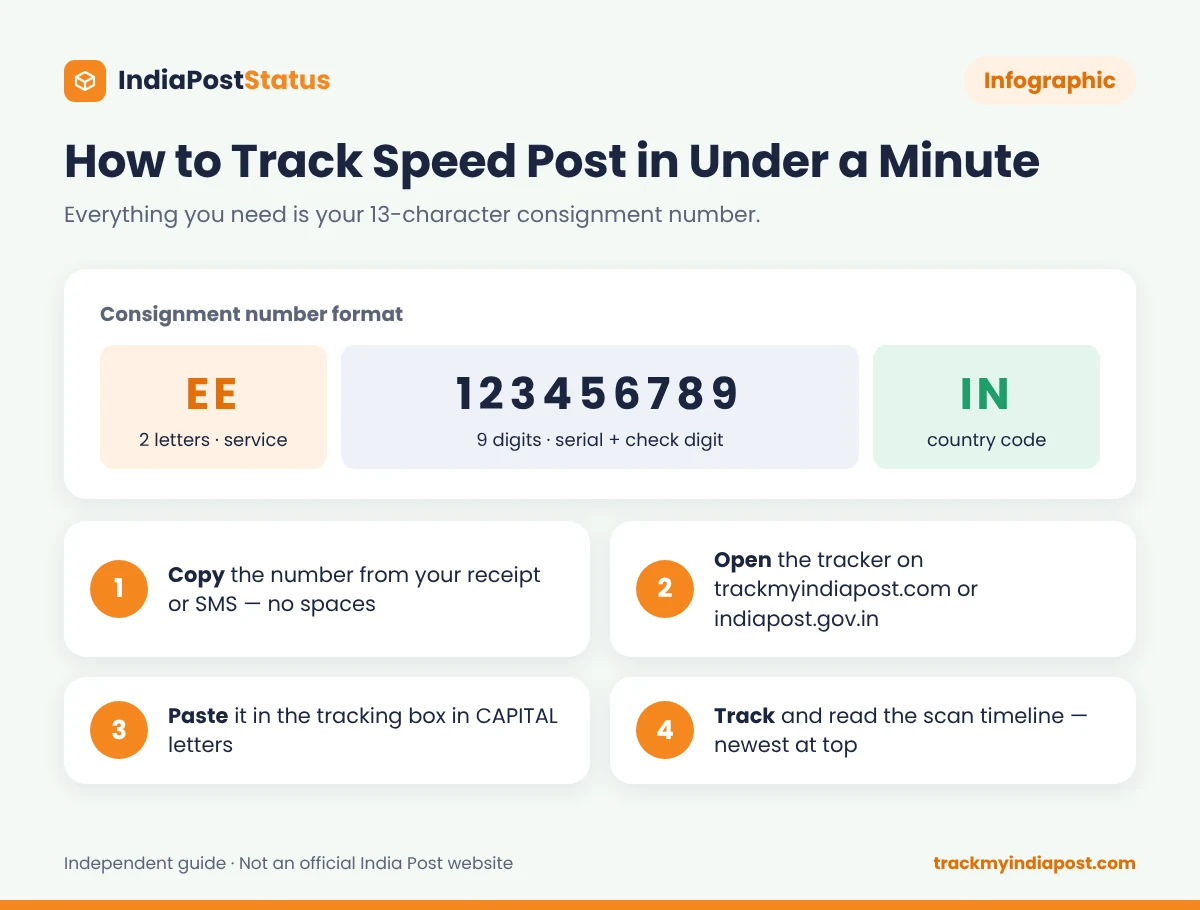
A domestic Speed Post consignment number has 13 characters in this format:
- 2 letters – the service prefix. Speed Post articles usually begin with the letter E (for example EE, EK, EM).
- 9 digits – the unique serial number, including a check digit.
- “IN” – the country code for India.
Example: EE123456789IN. If your number starts with R, it is a registered article booked under the older Registered Post format; you can track it the same way.
How to Track Speed Post Online: Step-by-Step
Tracking takes less than a minute. Here is the quickest method:
- Copy your consignment number from the receipt or SMS. Make sure there are no spaces before or after it.
- Open the tracker on the trackmyindiapost.com homepage, or use the official India Post website at indiapost.gov.in.
- Paste or type the number into the tracking box, using capital letters.
- Click Track. You will see a timeline of every scan – the office name, date, time and event – with the latest update at the top.
Other Ways to Track Your India Post Consignment
1. India Post Mobile App
India Post’s official app lets you track articles, find your nearest post office and calculate postage. Enter your consignment number in the tracking section to see the same scan history that appears on the website.
2. India Post Call Centre
You can call the India Post toll-free helpline at 1800 266 6868. Call-centre agents are available from 8:00 AM to 8:00 PM, and the automated IVRS service works 24×7, 365 days a year. Keep your consignment number ready before you call.
3. Visit the Booking Post Office
If online tracking is unclear, the booking post office can check the internal system and contact the delivery office on your behalf. Carry your original booking receipt.
Understanding Your Tracking Results
Your tracking timeline usually moves through these stages:
- Item Booked – the article has been accepted at the post office.
- Item Bagged – it has been sealed into a mail bag for transport.
- Item Dispatched – the bag has left for the next sorting hub or destination.
- Item Received – the article has arrived at a hub or the delivery post office.
- Out for Delivery – the postman is carrying it for delivery today.
- Item Delivered – it has been handed over to the addressee or an authorised person.
Occasionally you may see statuses such as “Addressee Absent”, “Door Locked” or “Insufficient Address”. These mean a delivery attempt was made but could not be completed. The article is normally kept at the delivery post office for collection or re-attempted the next working day.
Why Is My Speed Post Tracking Not Updating?
It is common to see no movement for a day or two. Here are the most frequent reasons:
- Recently booked: booking data can take a few hours to appear online, especially for evening bookings.
- In transit between hubs: articles are scanned at sorting centres, not while on a truck, train or flight. Long-distance journeys can show a gap of one to three days.
- Holidays and Sundays: sorting and delivery slow down on public holidays and Sundays.
- Typing errors: a single wrong digit returns “no record found”. Recheck the number carefully.
- Scan missed: sometimes a manual scan is skipped at a small office; the next scan will usually fill in the journey.
If there has been no update for more than five to seven working days, contact the helpline or raise a complaint on the India Post grievance portal with your consignment number and booking receipt.
How Long Does Speed Post Take to Deliver?
Delivery time depends on distance and location. As a general guide, local and metro-to-metro Speed Post often arrives within one to three days, deliveries within the same state usually take two to four days, and deliveries to remote or hilly regions can take five to seven days or more. Weather, festivals and peak seasons can add delays.
Tips for Faster and Safer Speed Post Delivery
- Write the complete address, including house number, landmark and the correct 6-digit PIN code.
- Always add the recipient’s mobile number so they receive SMS updates and OTP for delivery.
- Opt for OTP delivery or Registration (₹5 each plus GST) for valuable or sensitive documents.
- Keep the receipt safely until the article is delivered – you will need it for any complaint or claim.
- Book early in the day to catch the same-day dispatch at most post offices.
Tracking Speed Post for Businesses and Bulk Senders
If you send many articles every day, tracking them one by one is slow. Businesses with a Speed Post contract account can use India Post’s bulk booking and tracking facilities to upload consignment lists and monitor delivery status in one place. New bulk customers also get a special 5% discount on the Speed Post tariff, while students get 10% off. For e-commerce sellers, sharing the tracking number with the buyer by SMS or email right after booking reduces “where is my order” calls and builds trust. Encourage customers to save the number and check the tracker before calling support.
Final Thoughts
Speed Post tracking is simple once you know where to find your 13-character consignment number and how to read the status timeline. Bookmark the India Post tracking tool on our homepage to check your Speed Post, parcel and registered articles any time, from any device.
Frequently Asked Questions
How can I track Speed Post with my consignment number?
Enter your 13-character consignment number (for example EE123456789IN) into the tracker on trackmyindiapost.com or the official India Post website and click Track. You will see every scan event with date, time and office name.
How many digits is a Speed Post tracking number?
A domestic Speed Post tracking number has 13 characters: two letters, nine digits and the country code IN.
Can I track Speed Post without the consignment number?
Online tracking needs the consignment number. If you have lost it, visit the booking post office with your booking details, or ask the sender to share the receipt.
What is the India Post customer care number for Speed Post?
The India Post toll-free helpline is 1800 266 6868. Agents are available from 8 AM to 8 PM, and the IVRS service works 24×7.