India Post Payments Bank IFSC Code: IPOS0000001 Explained (2026)
The India Post Payments Bank IFSC code is IPOS0000001 for every IPPB account in India. Learn how to use it for NEFT, IMPS and RTGS, and how it differs from IPOS0000DOP for Post Office Savings accounts.
If you want to send money to an India Post Payments Bank (IPPB) account, the one detail that confuses most people is the IFSC code. The good news: it is the same everywhere. The India Post Payments Bank IFSC code is IPOS0000001, and it works for every IPPB account in the country, no matter which post office or village the account was opened in.
This guide explains what the code means, how to use it for NEFT, IMPS and RTGS, and why you might also see a second code, IPOS0000DOP, which is meant for Post Office Savings Bank accounts.
IPPB IFSC Code at a Glance
| Detail | Information |
|---|---|
| Bank name | India Post Payments Bank (IPPB) |
| IFSC code | IPOS0000001 |
| Branch (as per RBI listing) | Corporate Office / IMPS, New Delhi |
| Address | Speed Post Centre Building, Market Road, New Delhi – 110001 |
| MICR code | Not applicable |
| Works for | NEFT, IMPS and RTGS to any IPPB account |
| IPPB customer care | 155299 |
What Does IPOS0000001 Mean?
Every IFSC (Indian Financial System Code) has 11 characters:
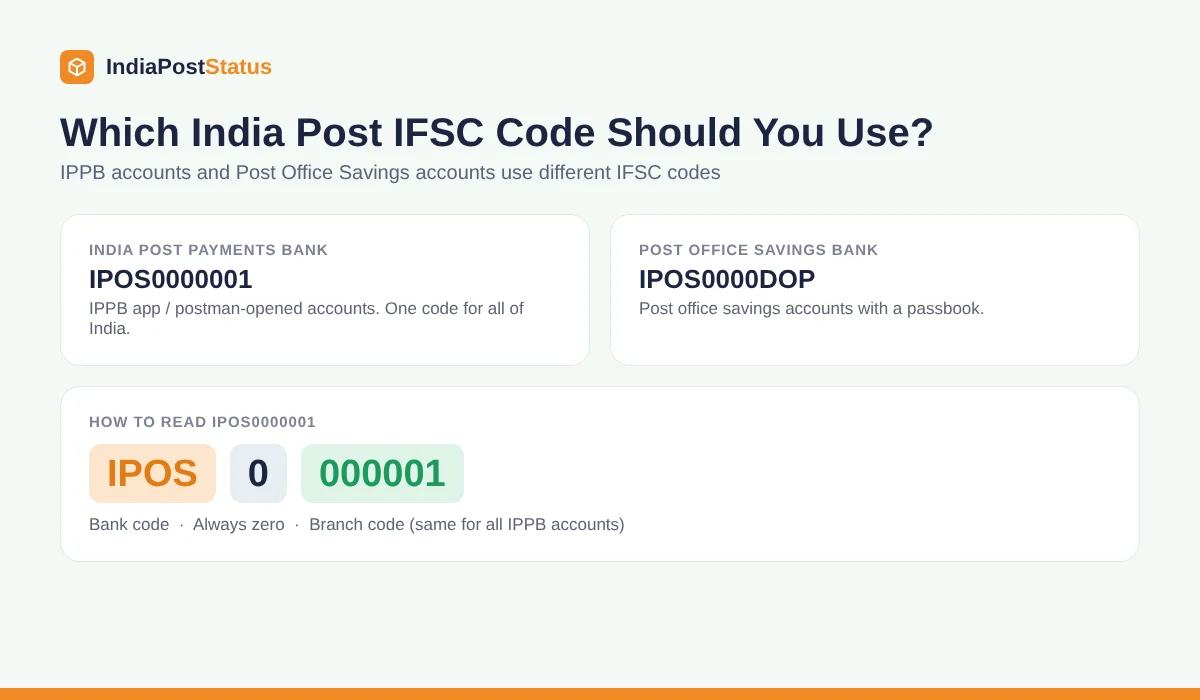
- IPOS – the first four letters identify the bank (India Post Payments Bank).
- 0 – the fifth character is always zero, reserved for future use.
- 000001 – the last six characters identify the branch. IPPB uses a single centralised code, so this is the same for all accounts.
Unlike traditional banks that have a different IFSC for every branch, IPPB runs a centralised system. Whether your account was opened at a head post office in a city or by a Gramin Dak Sevak at your doorstep, you use IPOS0000001.
IPOS0000001 vs IPOS0000DOP: Which One Should You Use?
This is the most common mistake people make. There are two different types of accounts linked to India Post, and each has its own IFSC:
| IPOS0000001 | IPOS0000DOP | |
|---|---|---|
| Account type | India Post Payments Bank (IPPB) account | Post Office Savings Bank (POSB) account |
| Opened through | IPPB app, postman/GDS, IPPB counter | Post office savings counter |
| Where you find the account number | IPPB app, welcome kit or SMS alerts | Post office savings passbook |
| Used for | NEFT/IMPS/RTGS into IPPB accounts | NEFT/RTGS into POSB accounts |
Simple rule: if the account number came from the IPPB app or an IPPB welcome kit, use IPOS0000001. If it is a post office savings account from a passbook, use IPOS0000DOP. When in doubt, ask your post office or check your passbook/app before transferring a large amount.
How to Transfer Money to an IPPB Account
Using net banking or a banking app (NEFT/IMPS)
- Log in to your bank’s app or net banking and go to Add Beneficiary.
- Enter the beneficiary name exactly as on the IPPB account.
- Enter the IPPB account number and re-enter it to confirm.
- Enter the IFSC code IPOS0000001. The app should auto-fill “India Post Payments Bank”.
- Save the beneficiary, complete OTP verification and send money via IMPS (instant) or NEFT.
Using UPI
Most IPPB accounts are UPI-enabled. If the recipient has linked their IPPB account to a UPI app, you can simply pay to their UPI ID or mobile number; no IFSC is needed. Many UPI apps also let you pay using “Account number + IFSC”, where you would enter IPOS0000001.
Where to Find Your IPPB Account Number
- In the IPPB mobile banking app, on the home screen or account details page.
- In the welcome letter or QR card given when you opened the account.
- In your SMS alerts from IPPB.
- By asking at your nearest post office or your postman/GDS.
Common Problems and Fixes
- “Invalid IFSC” error: check that you typed the letter O in “IPOS” and zeros in “0000001”. It is I-P-O-S, then six zeros and a one.
- Transfer failed or returned: the account number may be wrong, or you used IPOS0000001 for a post office savings account (or vice versa). Check the account type.
- Money debited but not credited: IMPS failures usually reverse automatically. If not, raise a complaint with your bank using the transaction reference number, or call IPPB on 155299.
FAQs
What is the IFSC code of India Post Payments Bank?
The IFSC code of India Post Payments Bank is IPOS0000001. It is the same for all IPPB accounts across India.
Is the IPPB IFSC code different for each branch?
No. IPPB uses one centralised IFSC code, IPOS0000001, for all its accounts.
What is IPOS0000DOP?
IPOS0000DOP is the IFSC code used for Post Office Savings Bank (POSB) accounts, not IPPB accounts.
Does India Post Payments Bank have a MICR code?
No MICR code is listed for IPPB. MICR codes are mainly used for cheque clearing; for online transfers you only need the IFSC code IPOS0000001.
Can I use IPOS0000001 for RTGS?
Yes. IPOS0000001 works for NEFT, IMPS and RTGS transfers to IPPB accounts.
Disclaimer: TrackMyIndiaPost is an independent information website and is not affiliated with India Post or India Post Payments Bank. Please verify bank details with IPPB before making large transfers.